The Business Need
Technology operations involved far more than maintaining servers
and responding to help desk requests. Staff managed projects,
user accounts, applications, systems, hardware, documentation,
support requests, network services, assets, standards, credentials,
and ongoing operational changes.
Much of that information naturally existed in different systems
or depended on the knowledge of individual staff members. IT Central
was developed to provide a shared operational environment for managing
the work of the IT organization itself.
What I Built
I developed IT Central as a role-based ASP.NET application integrating
day-to-day IT management with enterprise systems and infrastructure.
It supported IT administrators as well as separate interfaces for
employees and students.
The application combined project and task management, help desk,
user administration, asset management, application and system
inventories, documentation, knowledge management, operational logging,
and administrative tools within a single environment.
Direct integration with Active Directory, Exchange, System Center,
telecommunications systems, databases, and other infrastructure
allowed IT Central to connect administrative workflows with the
technical environment those workflows affected.
Key Capabilities
Projects & Operational Work
Manage projects, tasks, deadlines, assignments, department-wide
work, parts orders, operational notes, server-room inspections,
and historical records of system changes.
Help Desk & Service Delivery
Integrated support requests with information about users,
locations, computers, priorities, categories, technicians,
communications, history, and performance reporting.
Identity & User Administration
Support employee and student account administration through
integration with Active Directory, Exchange, student information,
and related applications.
Enterprise Knowledge
Maintain shared information about applications, systems,
hardware, standards, processes, sites, contacts, credentials,
documentation, and other operational knowledge.
One Operational Environment
IT Central connected several different dimensions of technology
management that are often handled independently.
People
Employees, students, technicians, network accounts,
security groups, email accounts, locations, and access.
Work
Projects, tasks, help desk requests, priorities,
assignments, deadlines, documentation, and operational changes.
Technology
Applications, systems, computers, servers, hardware,
assets, telecommunications, and supporting infrastructure.
Knowledge
Standards, processes, contacts, credentials, links,
historical records, technical documentation, and system information.
Data & Integration
SQL Server served as the core repository, with extensive business
and operational logic implemented through T-SQL stored procedures
and functions.
IT Central integrated with enterprise platforms including Active Directory,
Exchange Server, SharePoint, Microsoft System Center, Cisco Unified
Communications Manager, MySQL, Microsoft Access, Excel, flat files,
and other organizational data sources.
Enterprise Systems
Directory · Email · Systems · Data
↔
IT Central
ASP.NET / SQL Server
↔
IT Operations
People · Work · Assets · Knowledge
Role-Based Service
Employees
Manage personal profile information, update network passwords,
access IT information, submit help desk requests, and review
current or historical support activity.
Students
Access a simplified interface for network profile information,
password management, and IT-provided information.
IT Administrators
Manage operational work, users, infrastructure, applications,
support, assets, documentation, inventories, systems,
standards, and technical services.
Management
Gain visibility into projects, workload, help desk activity,
assignments, operational status, history, and performance.
Technology
ASP.NET
VB.NET
SQL Server
T-SQL
Telerik UI
AJAX
jQuery
XML
PowerShell
Active Directory
Exchange
SharePoint
System Center
SSIS
Cisco UCM
Selected Screens
Examples showing operational management, organizational knowledge,
and enterprise technology governance within IT Central.
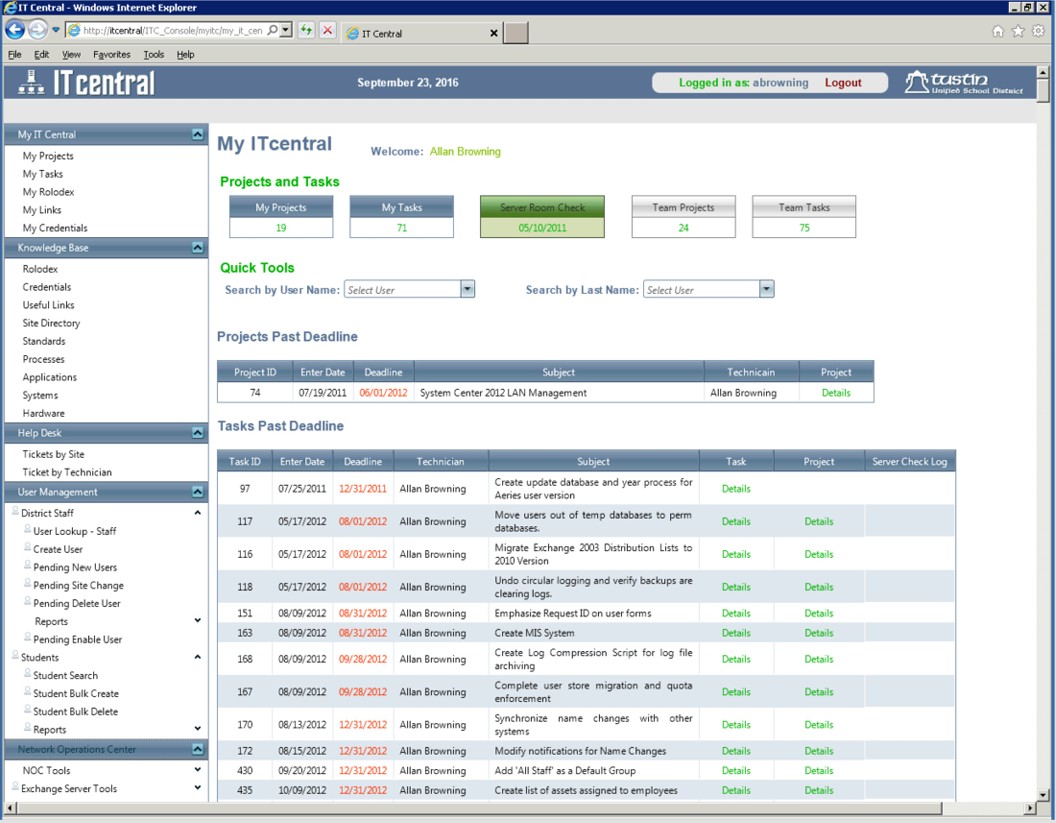
My IT Central
A personalized operational dashboard bringing together
projects, tasks, overdue work, team activity, quick tools,
support, user administration, and technical operations.
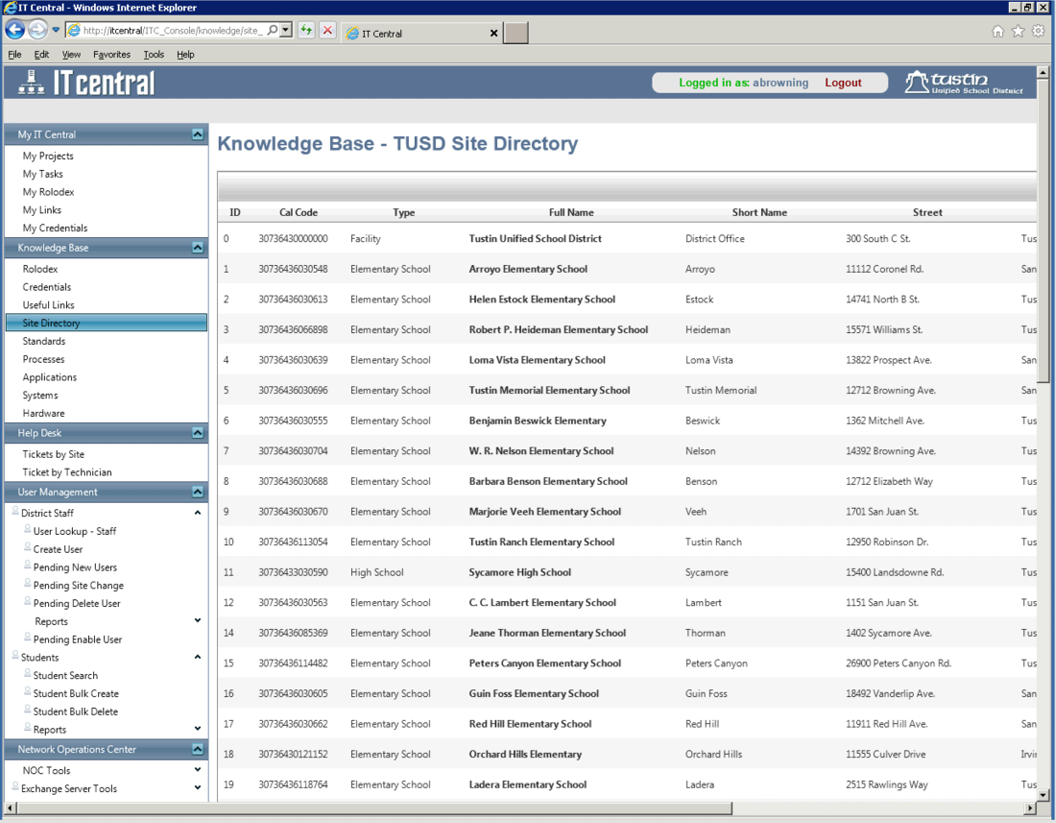
Organizational Knowledge Base
Shared operational information covering district sites,
contacts, standards, processes, applications, systems,
hardware, credentials, and other technical knowledge.
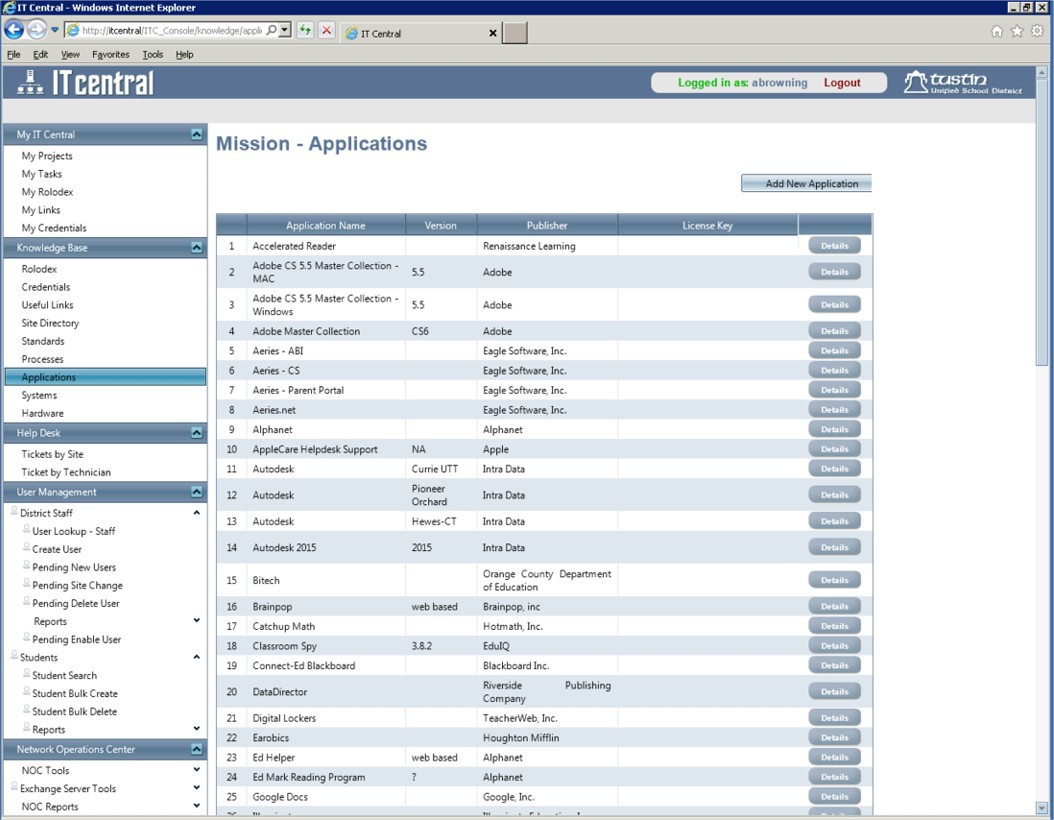
Application Portfolio
A centralized inventory of organizational applications
supporting ownership, versions, publishers, licensing,
documentation, and broader technology governance.
Broader Value
Managing IT as an Organizational System
IT Central was not simply a collection of administrative tools.
It brought together the people, work, technology, information,
responsibilities, and history required to operate an IT organization.
That shared environment reduced dependence on individual knowledge,
created greater visibility into operational work, connected technical
administration with service delivery, and provided a more durable
organizational record of how technology was managed.